Share this
by Jordan Wilton on November 17, 2026
TL;DR: PSA software should cover ten things: CRM integration, quoting, project planning, resource planning, time and expenses, contract management, billing, accounting integration, live margin reporting and AI. Just as important: each one should feed the next.
Services firms rarely lose margin in one big mistake. They lose it in the gaps: a won deal retyped into a project tool, hours logged a week late, an invoice rebuilt from three exports. This checklist covers the ten PSA software features that close those gaps, and what to ask a vendor to show you for each.
It's written for consulting firms, marketing agencies, software and IT services companies, architects and engineers, and financial services and accounting firms. It isn't about tools for IT managed service providers (MSPs), which center on monitoring client devices.
What features should PSA software have?
PSA (professional services automation) software should cover the full path from won deal to paid invoice: CRM integration, quoting, project and task planning, resource planning, time and expense tracking, contract management, billing, accounting integration, live margin reporting and AI assistance. Each feature should pass its data to the next, so nobody retypes a deal, an hour or an invoice line.
PSA software is one type of professional services software. If you need the basics first, start with our guide to PSA software. The table below sums up the ten features this article covers.
| Feature | What it replaces | Ask the vendor to show you |
|---|---|---|
| 1. CRM integration | Retyping won deals into a project tool | A test deal closed in your CRM, and the fields still typed by hand |
| 2. Quoting | Price-only quotes in Word or Excel | Where an underpriced line gets flagged before you send |
| 3. Project and task planning | A task tool plus a budget spreadsheet | Task progress and budget burn on one screen |
| 4. Resource planning | The planning spreadsheet | Everyone with a given skill who is free next month |
| 5. Time and expense tracking | Friday timesheets and a separate expense tool | Calendar meetings landing on the right projects, and a phone receipt on the draft invoice |
| 6. Contract management | Month-end budget checks | Who gets told when a project passes 80% of its budget |
| 7. Flexible billing | Invoices rebuilt from exports | A retainer and a fixed fee invoiced side by side |
| 8. Accounting integration | CSV exports to finance | An approved invoice arriving in your accounting software, and the paid status coming back |
| 9. Profitability reporting | Margin known after the project closes | Estimated and actual margin for a running project, updated as hours are approved |
| 10. AI assistance | Manual reports and chasing updates | The AI answering which projects will miss their margin, and the data behind that answer |
SPI Research's numbers point the same way. In SPI Research's 2026 PSA End-User Survey of 101 firms, respondents ran 75.9% of their services business in their PSA on average. SPI concluded that professional services automation tools deliver the most value when they're connected to CRM, HR, finance and business intelligence systems.
What should you look for when evaluating PSA software?
What to look for in PSA software comes down to ten features, and to how well each one passes data to the next. For each feature below, you'll find what it does, why it matters for your margin, and what to ask a vendor to show you. Small firms can start with fewer.
1. CRM integration: won deals become projects without retyping
CRM integration in a PSA starts each project from the won deal: client, contacts, amount, currency and the agreed scope. Every field someone retypes is a chance to get the scope or budget wrong on day one, before any work has started.
Ask for a two-way connection. Project progress and invoice status should flow back to the CRM, so account managers don't have to chase delivery for updates.
In PSOhub, projects start from deals in HubSpot, Salesforce, Microsoft Dynamics 365 or Pipedrive, and nothing is entered twice between winning the work and sending the invoice. With the HubSpot integration, project activity also shows on the deal, company and contact records.
A CRM isn't required, though. You can create clients and projects in PSOhub directly, and for tools that aren't listed, there is an API. See all CRM and accounting integrations.
Ask the vendor to show you: a test deal closed in your CRM, and which fields someone still has to type into the project.
2. Quoting: the margin shows before you sign
Quoting in a PSA should show what each line will earn before the quote goes out. If the tool only prints a price, you find out a line was underpriced when the hours come in. Ask for quotes built from the deal, with hours planned per role.
With PSOhub's Smart Quotes, you start from the deal or opportunity, pick your contract and budget templates, and choose how each line is billed. You see what every line will earn, the client signs online, and the signed quote becomes the project.
A signed quote is locked, with a record of who signed and when. One limit to know: a quote takes the deal's details when you create it and doesn't update if the deal changes afterwards.
Ask the vendor to show you: a quote with one underpriced line, and where the tool flags it before you send.
3. Project and task planning: work and budget share one screen
Project and task planning in a PSA puts planned hours, used hours and remaining budget next to the tasks, per contract line. A project tool gives you Gantt charts and task boards. A PSA adds the money.
Templates matter more than they look. Digital Inside, a marketing agency, makes one project template per marketing activity and copies it to almost every new client, so projects start with the same structure (read the Digital Inside story).
Project management in PSOhub combines a Gantt chart with dependencies and milestones, task lists or a Kanban board, and budgets by role, person and contract line. Task management keeps assignments and deadlines inside the same project. Clients can follow along too: the guest portal gives them a view into their project.
Ask the vendor to show you: a running project with task progress and budget burn on the same screen.
4. Resource planning: you see who's free and who fits
Resource planning answers two questions before you commit to new work: who has time, and who has the right skills. A spreadsheet answers the first one badly and the second one not at all.
You want availability that counts absences and planned hours across every project, filters for role and skill, and a backlog for work nobody has picked up yet.
PSOhub's resource and capacity planning filters people by role or skill, such as a language or a diploma, and shows which of them are free. Agentic AI can propose who should staff a new project and books the plan once you approve it. For the wider case, read why you still need resource management software.
Ask the vendor to show you: everyone with a specific skill who is free next month.
"The first reactions are positive, and they use the resource planning in the weekly meetings with their project team(s)."
Bertine van Brakel, Founder, C2N
5. Time and expense tracking: every hour and cost lands on the project
Time and expense tracking feeds every budget, invoice and margin in a PSA, so hours and costs need to arrive while the work is fresh. If hours come in on Friday afternoon from memory, every report built on them is an estimate.
Expenses need the same treatment. Travel, subcontractors and software bought for a client belong on the project, where they count toward its margin the day they're spent and are ready for the next invoice. In a separate expense tool, they're missing from the margin and often from the invoice.
Digital Inside reports a 12% increase in billable hours through more accurate time tracking after moving to PSOhub (case study). Its owner, Guido Tijmensen, summed up the problem: "Time keeping is important, but also difficult."
In PSOhub's time and expense tracking, people log hours and expenses on the project, with the receipt attached, from the web or the mobile app. The mobile app runs in your phone's browser, so there's nothing to install, and it needs a connection to submit entries.
Ask the vendor to show you: a week of calendar meetings landing on the right projects, and an expense added on a phone appearing on the draft invoice.
Want to see how this would work for your firm? In a 20-minute discovery call, we look at how your deals, hours and invoices move today, and where PSOhub fits.
6. Contract management: budget alerts come while you can still act
Contract management in a PSA holds the rates, budget and billing model for each contract line, and warns you while the project still has budget left. That's when you can still change the plan, raise a change request or talk to the client. A budget you only check at month-end tells you what already went wrong.
The basics are selling and cost rates per role, alert thresholds you set per contract line, and the option to stop time being booked once a budget is used up. Appronto, a software developer with around 30 employees, relies on that warning.
"The best feature for us is the smart contract feature. It notifies me when we are at 80% of the contract worth, and it makes managing the project easier."
Sven Ernest, Manager of Operations, Appronto
Appronto reports 8% more billable hours since switching to PSOhub (read the Appronto story). In PSOhub's contract management, you set thresholds per line or group, and Agentic AI Insights notifies you when a budget starts to drift.
Ask the vendor to show you: what happens when a project passes 80% of its budget, and who gets told.
7. Flexible billing: every model invoices on schedule
Flexible billing means each contract line follows its own model: fixed fee, time and materials, retainer, installments or expenses, sometimes all within one project. The PSA should create each invoice when it's due, so nobody rebuilds invoices from exports.
This is where money leaks. In SPI Research's 2026 PSA End-User Survey, respondents reported revenue leakage falling from 5.8% to 4.2% after adopting PSA, and days sales outstanding falling from 49.6 to 42.9. The figures are self-reported, so treat them as a direction rather than a forecast.
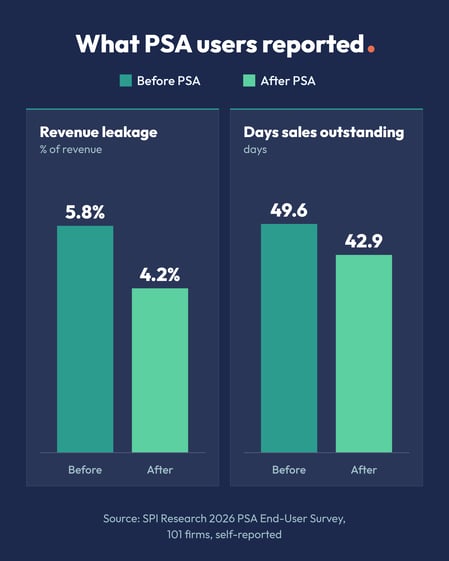
Source: SPI Research, 2026 PSA End-User Survey (self-reported, 101 firms).
Smart Invoicing in PSOhub creates invoices monthly, per installment or when a milestone is done, and can invoice on work in progress. Nothing reaches a client until someone approves it, unless you've set a routine invoice to go out automatically.
Corrections go through a full or partial credit note, and the original invoice stays on record. For retainers in particular, see our guide to managing and invoicing retainers.
Ask the vendor to show you: a retainer and a fixed-fee line in one project, and next month's invoices for both.
8. Accounting integration: invoices arrive ready to book
Accounting integration hands approved invoices to your accounting software and brings the payment status back. If that handoff is a CSV export, finance does the work twice.
This matters more every year in Europe. Since 1 January 2026, Belgian VAT-liable businesses must use structured electronic invoices with each other. Under the EU's VAT in the Digital Age package, digital reporting for cross-border B2B transactions starts on 1 July 2030. Ask each vendor how its invoices reach the system that sends your e-invoices.
PSOhub pushes approved invoices to accounting software such as Xero, QuickBooks Online, Exact Online, SAP Business One and Sage, and each legal entity in a group can connect its own system and invoice in its own currency.
With Exact Online, for example, you choose whether the client gets the invoice from PSOhub or from Exact. With Exact Online and Xero, the paid status syncs back to PSOhub.
Where e-invoicing applies, sending from the accounting software keeps the invoice inside the e-invoicing setup you run there.
Ask the vendor to show you: an approved invoice arriving in your accounting software, and the paid status coming back.
9. Profitability reporting: margins show while the project runs
Profitability reporting shows what a project earns while you can still change it. You want estimated and actual margin side by side, updated as hours are approved. Revenue recognition matters too, so reported revenue follows the work done rather than the invoices sent. Accounting standards such as IFRS 15 set the rules for that.
Need custom reports? PSOhub exports to Excel and connects to Power BI or another BI tool through an OData feed. For the numbers to watch each week, see our guide to project profitability KPIs.
Ask the vendor to show you: estimated and actual margin for a running project, updated as hours are approved.
"PSOhub makes it easier for management to steer on what are the valuable customers and who are the bleeders in the organization."
Guido Tijmensen, Owner & Strategist, Digital Inside
10. AI assistance: answers come fast, and changes wait for approval
AI assistance in a PSA should answer questions about your projects from your own data and prepare routine changes for a person to approve. In SPI Research's 2026 PSA End-User Survey, the most common AI capabilities in PSA were assistants and workflow guidance (36.9%), resource matching (34.8%) and project-risk alerts (33.8%).
It's worth testing with care. SPI Research's 2026 study of 245 firms found that 84.8% get value from AI through time savings, but only 29.9% through revenue. In the same study, 71.9% require human review before AI output reaches a client.
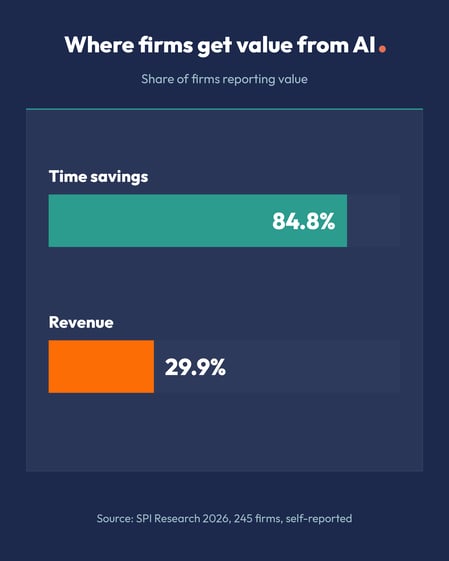
Source: SPI Research, 2026 Impact of AI on Professional Services (self-reported, 245 firms).
PSOhub's Agentic AI follows the same idea. Insights reads your data, answers questions and sends alerts, while Actions prepares changes and waits for your approval. Each person connects with their own PSOhub login, so the AI sees only what their role allows. It works through MCP with Claude and ChatGPT, and other MCP-capable tools.
Ask the vendor to show you: the AI answering which projects will miss their margin, and the data behind that answer.
What should team time tracking in a PSA include?
Time tracking for professional services firms should capture hours where the work happens, tie each hour to a project, task and rate, and send it through approval before billing. If any of those steps lives in another tool, hours go missing or get billed at the wrong rate.
Six things to look for:
- Calendar capture: meetings from Outlook or Google Calendar land on the right project, or the tool asks when it isn't sure.
- A timer and a weekly view: people start a timer on a task or in the browser, and fill in the rest of the week on one screen.
- Mobile entry: consultants log time and expenses from a phone between client visits.
- A rate on every entry: each hour lands on a contract line with a selling and cost rate, so budgets and margins update as it's approved.
- Reminders: managers see who hasn't finished their timesheet and send a nudge, by hand or automatically.
- Approval: project leads approve hours before billing and send wrong entries back with a reason.
Completion is the real test. ITSEC, a cybersecurity and compliance consultancy, went from inconsistent tracking to almost complete timesheets within months of moving to PSOhub (read the ITSEC story). Time and expense tracking in PSOhub covers all six points. For calendar entries, it books each meeting on the right project, or suggests one when it isn't sure.
How is PSA software priced, and what should you ask?
Many PSA tools are priced per user per month, often in tiers. The license is rarely the whole cost. Onboarding, data migration, add-ons such as AI or extra integrations, and the admin time to keep the system running all count. Compare the total cost for your team, not the price per seat.
Ask every vendor on your shortlist:
- Which tier includes everything on this checklist, and what moves you to a higher tier?
- Do people who only log time pay the full user price?
- What do onboarding and data migration cost, and who does the work?
- Are the CRM and accounting integrations included, or extra?
- Which AI features are included, and which are paid add-ons?
- How can the price change at renewal?
What do connected PSA features look like from won deal to paid invoice?
Hypothetical example. Take an IT consultancy that sells in HubSpot and keeps its books in Exact Online. Without connected PSA features, every step from won deal to paid invoice needs someone to move data by hand. With them, each step feeds the next, and the margin is visible while the work is still open.
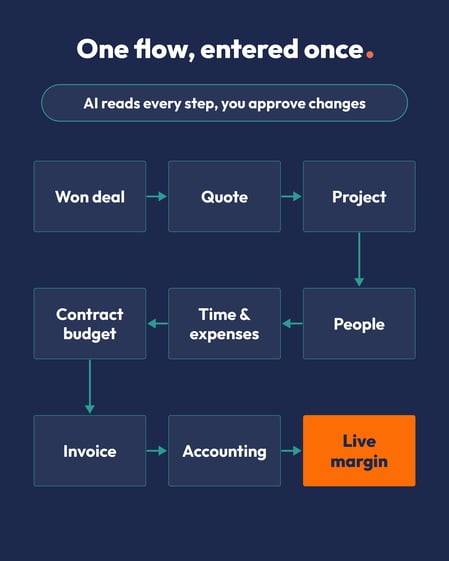
Each step passes its data to the next, so nothing is entered twice.
| Step | Without connected features | With connected features |
|---|---|---|
| Deal won | A project lead retypes client, scope and budget into a project tool | The project starts from the HubSpot deal, with client, contacts and amount |
| Staffing | Operations checks a spreadsheet and asks around | Filter by skill and availability, then approve the plan |
| Time | Timesheets chased every Friday | Meetings land from calendars, and leads approve hours weekly |
| Budget | The overrun shows up at month-end | An alert fires at the threshold set on the contract line |
| Invoice | Finance rebuilds it from three exports | A draft is built from approved hours, approved, and sent to Exact Online |
| Payment | Sales asks finance whether the client paid | Paid status updates in PSOhub and shows on the HubSpot deal |
The handoff from the deal works the same way with Salesforce, Microsoft Dynamics 365 or Pipedrive as the CRM.
When is a feature checklist the wrong place to start?
A checklist helps you compare tools, but it won't choose a PSA tool for you. In Capterra's 2026 Software Buying Trends Report, based on 3,385 software decision makers in 11 countries, only 34% of buyers had both a smooth purchase and a smooth rollout.
Defining requirements early made a difference: 62% of the successful buyers set their budget and must-have features up front, against 48% of disappointed buyers.
Three situations call for something other than this list:
- You're small and simple: if a handful of people run a handful of projects and one person can see everything, a good time tracker and your accounting software may be enough for now.
- You run a managed IT service: MSP tools are built around remote monitoring of client devices and service desk contracts, which a PSA for project-based firms isn't designed for. If you run projects and also handle support tickets, look for time tracking on tickets instead.
- You haven't ranked your problems: ten must-haves don't weigh the same for every firm. Our PSA buyer's scorecard helps you weight them by the pain you need to fix first.
Frequently asked questions
Does PSA software need a CRM?
No, PSA software works without a CRM. You can create clients, quotes and projects in the PSA itself. A CRM connection pays off once sales and delivery are different people, because the won deal then becomes the project without retyping. PSOhub works on its own or connected to HubSpot, Salesforce, Microsoft Dynamics 365 or Pipedrive.
Which PSA software features should you set up first?
Set up the PSA features behind your biggest leak first. For many professional services firms that's time tracking, project budgets and invoicing, because they answer questions you're already asking by hand. Resource planning and AI can follow once timesheets are complete every week. Ask each vendor how quickly each feature can go live, and who sets it up.
Can PSA software track time on support tickets?
Yes, some PSA software can track time on support tickets, so support work is billed like project work. PSOhub, for example, lets your team log time directly on HubSpot Service Hub tickets, mark those hours as billable and invoice them. Check whether a PSA supports tickets in the help desk you already use.
How is PSA for professional services different from PSA for MSPs?
PSA software for professional services runs projects, people, time and billing for firms that sell expertise, such as consultancies and agencies. PSA for IT managed service providers (MSPs) is built around monitoring client devices and service desk contracts. If your revenue comes from projects and retainers, you need the first kind.
Is HubSpot a PSA software?
No, HubSpot isn't PSA software. HubSpot is a CRM platform, where sales wins the deal. A PSA takes over from there and runs projects, resource planning, time and billing on contract lines. PSOhub connects to HubSpot, so a won deal becomes a project and project activity shows on the HubSpot deal.
Is one PSA better than separate best-of-breed tools?
One PSA is usually easier to run than separate best-of-breed tools, because the handoffs between quoting, time, planning and invoicing live in one system. With separate tools, every link between them is something to build, maintain and check. Separate tools can still fit a small team with simple billing. Count integration and admin time before you decide.
Test your shortlist against these ten features
Take the summary table into your next vendor demos and ask each vendor to show you, not tell you.
Want to talk through what this would look like for your firm? Book a 20-minute discovery call. Prefer to try it yourself first? Start a 30-day free trial.
PSOhub is professional services automation software for consulting firms, marketing agencies, software and IT services companies, architects and engineers, and financial services and accounting firms.
Share this