Share this
by Bas van der Horst on November 22, 2026
TL;DR: PSA vs CRM, in short: a CRM tracks how you win clients (leads, deals, contacts). A PSA runs the work after Closed Won (projects, people, hours, invoices). Once you bill for time, you need both, connected.
Your sales team closes a deal in the CRM. Then the record goes quiet. Delivery rebuilds the scope in a project tool, hours land in a time tracker, and finance builds the invoice from a spreadsheet. The margin shows up weeks later, when nobody can fix it.
That gap is what PSA vs CRM comes down to. A CRM is built to win work, and PSA software, sometimes just called professional services software, is built to deliver it at a profit. Below you'll find what each one owns, where the handover happens and how to connect them when your CRM is HubSpot.
What's the difference between PSA software and a CRM?
A CRM (customer relationship management) system records how you find and win clients: contacts, companies, deals and pipeline stages. PSA (professional services automation) software runs the work after the deal is won: projects, staffing, time, budgets and invoices. So the CRM knows what you sold, and the PSA knows what it cost to deliver.
In HubSpot's own definition, a deal moves through your sales pipeline until it's won or lost. Everything that decides your margin happens after that, and that's where PSA software takes over.
| CRM | PSA software | |
|---|---|---|
| Question it answers | Will this deal close, and for how much? | Will this project make money? |
| What it owns | Contacts, companies, deals, pipeline, emails and meetings | Projects, tasks, people, hours, budgets, billing rules, invoices |
| Who uses it every day | Sales, marketing, account managers | Project managers, delivery teams, operations, finance |
| Where it starts and stops | From first contact to Closed Won | From Closed Won to the paid invoice |
| Numbers it reports | Pipeline value, win rate, forecast revenue | Hours against budget, utilization, margin per project |
Is a CRM for professional services the same as a PSA?
No. A professional services CRM, or any CRM set up for a consultancy, is still a sales system. It adds things like stakeholder maps, proposal tracking and renewal dates. It doesn't plan people, track billable hours against a budget or invoice from timesheets. Those jobs sit in a PSA.
| CRM for professional services | PSA software | |
|---|---|---|
| Tracks | Accounts, stakeholders, proposals, renewals | Projects, capacity, hours, budgets, invoices |
| Misses | What the work costs and who's free to do it | Lead scoring, campaigns, pipeline forecasting |
For the sales side, see our guide to CRM tools for consulting.
Where does the CRM stop and the PSA take over?
The handover happens at Closed Won. Up to that moment, the deal belongs to the CRM. After it, the PSA owns the project, the plan, the hours and the billing. A clean handover moves the deal data across once, keeps the project linked to the deal, and sends delivery updates back to the CRM record.
What crosses is small: the client, the contacts, the amount, the scope and a link back to the deal. Pipeline history, email threads and lead scores stay in the CRM. For a field-by-field map of HubSpot records to delivery records, see our HubSpot delivery stack guide.
What goes wrong when your CRM does PSA work?
When a CRM is stretched to run delivery, the data that decides margin ends up in custom fields, side spreadsheets and people's heads. Hours arrive late, budgets are checked by hand, and the firm learns a project lost money only after the final invoice. The CRM still looks tidy. The numbers behind it don't add up.
It tends to show up in the same places:
- Hours live in a custom deal property or a spreadsheet attached to the deal.
- Someone retypes the deal amount and contacts into a project tool after every win.
- Support work is handled on tickets but never billed.
- Account managers ask the project lead for an update before every client call.
- Project profitability shows up after the project closes, when it's too late to act.
If two of these sound familiar, your CRM is doing a job it wasn't built for.
Appronto, a Dutch software developer with about 30 people, hit this point with HubSpot. Timesheets, client time reports and contracts sat in separate tools. Its owner, Ronald Beer, puts it this way:
A few years ago we selected HubSpot as our CRM, Marketing and Sales solution. Unfortunately parts of the funnel-2-cash process couldn't be automated properly. Thanks to PSOhub we now can. This saves us a lot of manual, administrative work.
Ronald Beer, Owner, Appronto
Appronto now starts projects from the deal data already in HubSpot and runs contracts, timesheets and billing in one place. Appronto reports 8% more billable hours since the switch.
When does a firm need a PSA next to its CRM?
A firm needs a PSA when its margin depends on how the work is delivered: who does it, how many hours it takes and what gets billed. If you only sell fixed-fee work with a small team and nobody asks about utilization or margin per project, a CRM plus a simple time tracker can be enough for now.
Independent research points the same way. SPI Research's 2026 Professional Services Maturity Benchmark surveyed 509 professional services firms on their 2025 results. It found that high-performing firms are far more likely to deploy and integrate business systems such as CRM and PSA. The same study put billable utilization at 66.4%, the lowest in its 19-year history.
| A CRM alone is usually enough when… | You probably need both when… |
|---|---|
| You sell mostly fixed-fee work | You bill time and materials, retainers or installments |
| One person sees every project and everyone's week | More than one person plans who works on what |
| Invoices are simple and go out on a set date | Invoices wait for late hours |
| Nobody asks about margin per project | You only learn which clients make money after the quarter |
How does PSA software integrate with CRM tools?
PSA software integrates with a CRM by syncing a small set of records in both directions. When a deal reaches a chosen stage, the PSA creates a project from the deal data. During delivery, the PSA sends progress, budget alerts and invoice status back to the CRM, so sales and account managers see what's happening without asking.
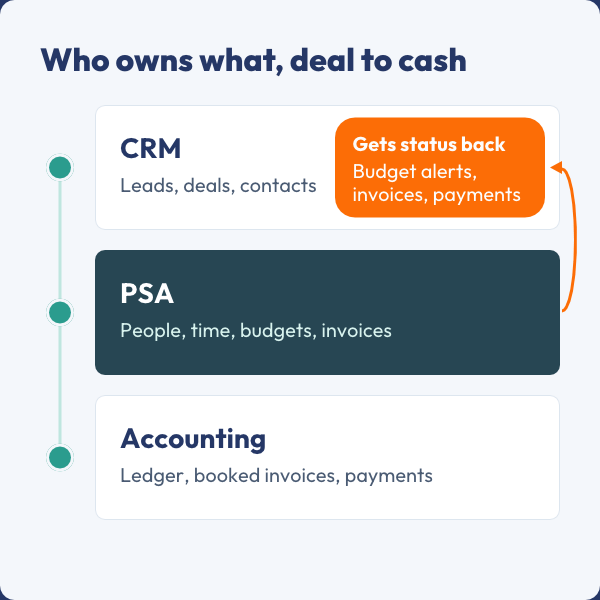
Who owns each step from won deal to paid invoice. Illustration: PSOhub.
PSA vs CRM, deal to cash: CRM holds deals and gets status back, PSA runs people, time and invoices, accounting books them Who owns each step from won deal to paid invoice. Illustration: PSOhub.
A typical flow from won deal to paid invoice:
- The deal reaches the trigger stage, usually Closed Won.
- The PSA creates a quote or project from the deal data and keeps it linked to the deal.
- Your team plans the work and logs time in the PSA against the project budget.
- The PSA posts project activity, budget alerts and invoice events back to the CRM record.
- The PSA sends the invoice to the accounting system, which books it, and payment status comes back.
| Direction | What moves | Who uses it |
|---|---|---|
| CRM to PSA, at Closed Won | Company, contacts, deal amount, currency, scope | Project managers, to plan without retyping |
| PSA to CRM, during delivery | Project activity, task status, budget alerts | Account managers, before client calls |
| PSA to CRM, at billing | Invoice created, sent and paid | Sales and finance, to know what's been paid |
| Both ways | Companies, contacts and tasks | Everyone, so names and owners stay the same |
Digital Reach, a digital marketing and rev ops agency, runs this loop between HubSpot and PSOhub. Mandy, its Chief Revenue Officer, explains:
And then of course, it also pushes updates over to HubSpot about the contract as well. I can deploy the contract from HubSpot so that it automatically creates the project in PSOhub.
Mandy, Chief Revenue Officer, Digital Reach
The accounting link is simpler: the PSA creates the invoice and sends it to your accounting software, which books it. Once the client pays, that status flows back. If you're weighing a full ERP instead, see our PSA vs ERP comparison.
| Connection method | How deep it goes | Upkeep | Best for |
|---|---|---|---|
| Two-way app from the PSA vendor | Records, activity and invoices, both directions | Low, the vendor maintains it | The core deal-to-invoice flow |
| Connector tools such as Zapier or Make | Single fields, usually one way | Breaks when fields or volumes change | Small alerts and side tasks |
| Custom API work | Whatever you build | High, you own every change | Unusual setups with developer time |
This integration brings sales and project management together, allowing the sales team to monitor the overall health of a project while other teams gain a clear understanding of project progress and expenditures.
Mansoor Khan, Business Analyst II, DotcomWeavers, G2 review.
Should your PSA be built into your CRM or connected to it?
You have three options: a PSA built on your CRM's platform, a PSA that includes its own CRM, or a PSA that connects to the CRM you already use. Each one trades simplicity against flexibility. The right choice depends mostly on how much your sales and marketing team relies on the CRM you have today.
| Model | Example | Good at | Watch out for |
|---|---|---|---|
| PSA built on a CRM platform | Certinia, built on the Salesforce platform (read November 2026) | One shared database with the CRM | You're tied to that CRM and its licenses |
| PSA with its own CRM | SuperOps, which markets built-in CRM features (updated October 2026) | One tool and one bill | The CRM side is usually lighter than a dedicated CRM |
| PSA connected to your CRM | PSOhub with HubSpot, Salesforce, Dynamics 365 or Pipedrive | Sales keeps its CRM, delivery gets a full PSA | Check that the sync is two-way and covers invoices |
Even vendors with their own CRM agree on one point. Projectworks' PSA vs CRM guide (July 2026) advises firms with real marketing activity to keep HubSpot or Salesforce and connect it to delivery. For a 20-person firm already selling from HubSpot, that's usually the cheaper path.
Which project tracking tools integrate with popular CRM systems?
Project tracking tools that integrate with popular CRMs like HubSpot and Salesforce fall into three groups: the CRM's own project features, task-based project management apps that connect through an integration, and PSA software that links projects to deals, time and invoices. They differ most in whether they track money as well as tasks.
The CRM's own project features
HubSpot's help article on projects (updated November 2026) lets you link projects to deals, view them on a Gantt chart or board, and create a project at Closed Won with a workflow. It doesn't describe time tracking, budgets or invoicing. That's enough for simple flat-fee work (more on its limits).
Task-based project management apps
These turn CRM deals into tasks or boards. They usually don't hold rates, budgets or invoices, so billing happens somewhere else.
PSA software with a CRM integration
This is where the deal becomes a project with a money layer: hours against budget and invoices. PSOhub's project tracking connects to HubSpot, Salesforce, Microsoft Dynamics 365 and Pipedrive.
Before you choose, check four things (the full checklist is in 10 essential PSA software features):
- Does the integration sync both ways, or only from the CRM?
- Can you see invoice status on the CRM record?
- Can support time on CRM tickets become billable hours?
- Is the PSA integration in your plan, or an add-on?
See it with your own deals. In a demo, we'll turn one of your HubSpot deals into a project and show you where the hours, budget and invoice status appear. Book a demo.
How does PSOhub connect HubSpot to delivery?
PSOhub is PSA software for professional services firms that connects to HubSpot. A won HubSpot deal becomes a PSOhub quote or project with the client data already filled in. Your team plans, logs time and invoices in PSOhub, while project activity and invoice status appear on the HubSpot record.
The homepage promise is simple: "Nothing is entered twice between winning the work and sending the invoice." In practice, the HubSpot integration covers this:
- A won deal becomes a quote or project. Deal name, description, currency, amount, company and contacts carry over, and the project stays linked to the deal.
- Tasks, companies and contacts sync both ways, and you can update the deal amount from the project.
- Project activity and invoice created, sent and paid events show up in the HubSpot activity feed.
- Your team logs time on HubSpot Service Hub tickets, marks it billable and invoices it in PSOhub.
- PSOhub Insights for HubSpot puts hours, budgets and invoices next to your deals in HubSpot reports.
It has limits too. A quote doesn't update if the deal changes after you create it. Invoices don't get their own tab in HubSpot, because HubSpot has its own invoicing tool. Invoices you create in PSOhub go to your accounting software, such as Xero or QuickBooks, and the paid status flows back once the client pays.
See how the HubSpot integration works step by step, or the full list of integrations.
Frequently asked questions
Does a PSA replace a CRM?
No. A PSA and a CRM do different jobs, so you keep both. Sales tracks leads, deals and client conversations in the CRM. The PSA takes over at Closed Won and runs projects, people, hours and invoices. Some PSA tools include a light CRM, but an active sales and marketing team usually needs its own.
Do we have to stop using HubSpot if we add a PSA?
No. A PSA that connects to HubSpot leaves your sales process where it is. Deals, contacts and pipelines stay in HubSpot. The PSA reads the won deal, creates the project and sends progress and invoice status back to the HubSpot record.
Will salespeople have to work in the PSA every day?
Usually not. With a two-way integration, salespeople stay in the CRM and see project activity, budget alerts and invoice status on the deal or company record. Project managers, consultants logging time and whoever sends invoices work in the PSA every day.
What happens to the project if the deal changes after it starts?
In PSOhub, a quote takes its details from the deal when you create it and doesn't change if the deal changes later. During delivery, tasks, companies and contacts keep syncing both ways, and the deal amount can be updated from the project. For a scope change, update the project and let the amount flow back.
Can we start with a CRM and add a PSA later?
Yes. That's the usual order. Before you add a PSA, agree which deal stage triggers delivery and which fields must be filled before a deal can close: client, contacts, amount and scope. Clean deal data lets any PSA pick up projects from day one.
Does a CRM integration cost extra in a PSA?
It depends on the vendor. Some PSAs include the CRM integration in every plan, others keep it for higher tiers or sell it as an add-on, so ask before you compare prices. PSOhub's pricing page states that all plans include time tracking, project management and the HubSpot integration.
Connect the deal to the delivery
Your CRM is good at winning work. Don't ask it to run projects too. Give delivery a PSA, connect the two at Closed Won, and let progress and invoice status flow back to the deal. Then the person selling the next project and the person running this one are reading the same numbers.
Want to see it with your own HubSpot deals? Book a demo. Prefer to try it yourself first? Start a 30-day free trial.
PSOhub is PSA software for professional services firms. It connects to HubSpot, Salesforce, Microsoft Dynamics 365 and Pipedrive, and runs quotes, projects, resource planning, time, invoicing and contracts in one system.
Share this