




Project planning
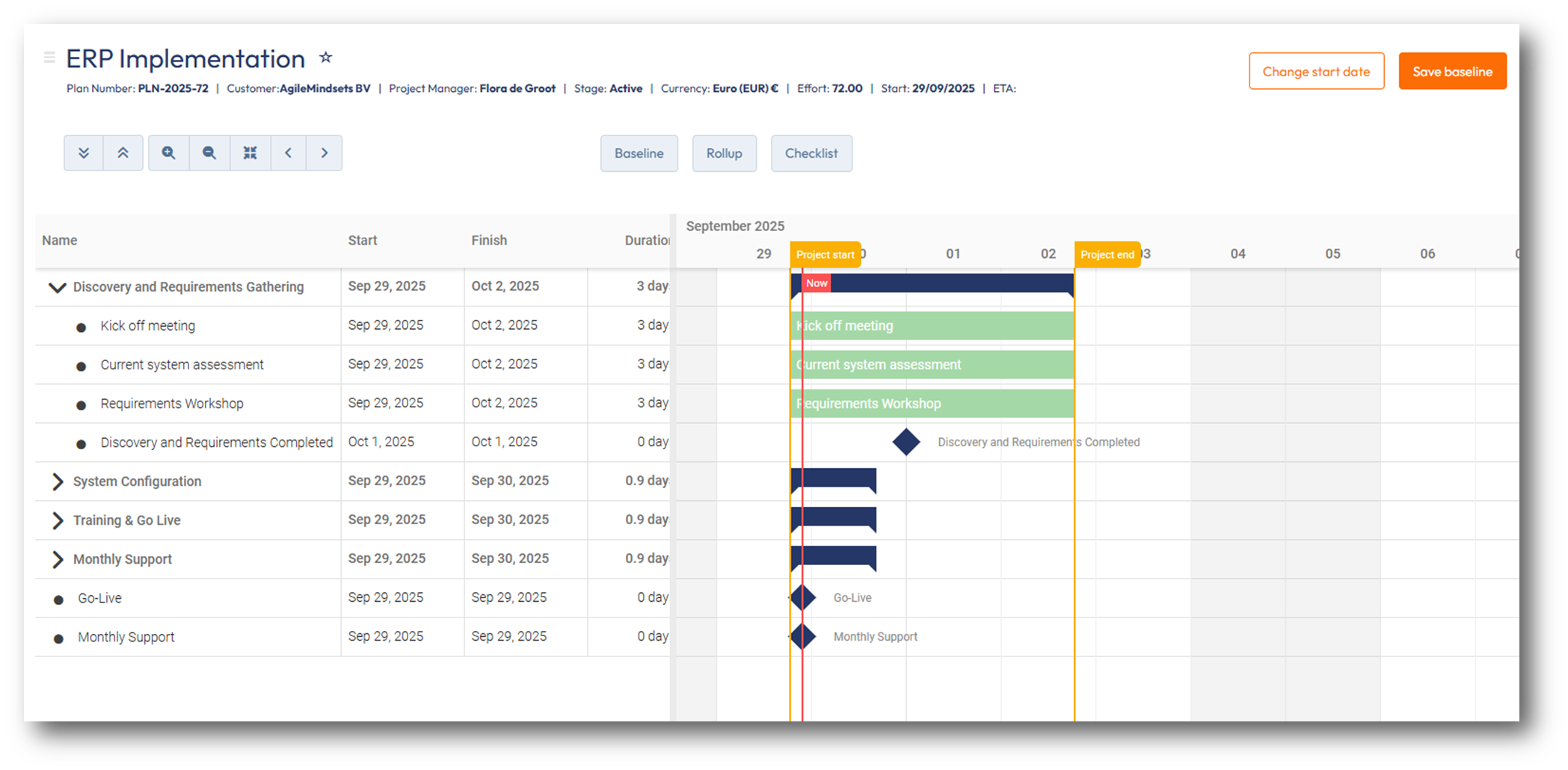
Visually plan your project with PSOhub's Gantt Chart
Assign resources to tasks, manage milestones, keep track of your planning, and much more...
"It gives us one place to manage all our time and tasks, ties all our records to customer contracts, and reveals profit and loss data, by customer. "
Game-changing features
Display all project tasks under their respective task list in a visual start based on start and due dates.

Assign resources to task directly from the Gantt Chart and get one overview of all tasks per resource.

Set dependencies for your project activities to show what needs to be finished before starting the new task.

Use milestones to show events, decision points or deliverables break up the project and improve progress monitoring.
Set priorities for your project activities and see completion percentages to see where you need to put focus on to keep your project in scope.

Share the Gantt Chart with your client via a view-only link to keep your client informed and offer transparency on your project progress.
Why use the Gantt Chart?
Planning projects can be challenging. A Gantt Chart simplifies the project planning by showing all project activities, dependencies, and milestones in one overview.
Using PSOhub's Gantt Chart helps you to keep track of the status of your project. Never miss a deadline and keep your customers happy!

Project scheduling tools that keep the whole plan in one place
Project scheduling tools let you lay out when work happens: the order of tasks, who does them, how long they take, and what depends on what. A Gantt chart is the most familiar one, and PSOhub's handles the scheduling and the doing in the same place.
What separates a real scheduling tool from a static chart is whether the schedule stays live. Because PSOhub connects tasks, time, and resources and syncs two ways with HubSpot, Salesforce, Microsoft Dynamics 365, and Pipedrive, the plan updates as work moves and sits right next to the customer data it depends on. Mark projects as favorites and one Gantt covers them all.

Frequently asked questions about project scheduling tools
A project scheduling tool is software for planning when work happens: the sequence of tasks, who is responsible for each, how long they take, and which tasks depend on others. It turns a list of work into a timeline you can manage, usually shown as a Gantt chart.
Yes. A Gantt chart is the most common form of project scheduling tool. It lays tasks out on a timeline by start and due date, shows dependencies and milestones, and makes it easy to see whether a project is on track. PSOhub's Gantt adds resources, priorities, and completion tracking to that view.
At a minimum it should let you set task dates and dependencies, assign people to the work, mark milestones, and see progress at a glance. The more useful ones keep the schedule live as work changes and connect it to the time logged and the resources assigned, so the plan reflects reality rather than a snapshot from kickoff.
A project scheduling tool focuses on the timeline: what happens when, and in what order. Project management software is broader, covering tasks, resources, budgets, time, and often billing. A Gantt chart is one scheduling feature inside PSOhub's wider project management platform, so you get the schedule and everything around it in one place.
With PSOhub, yes. You can assign people to tasks directly from the Gantt chart and see every task per resource in one overview, so scheduling the work and staffing it happen together rather than in separate tools.
Yes. PSOhub syncs two ways with HubSpot, and also with Salesforce, Microsoft Dynamics 365, and Pipedrive. The project schedule sits alongside the deal and customer data it came from, and a closed deal can become a scheduled project without re-entering anything.
PSOhub is free to start, so you can build and manage a project schedule without paying up front, then move to a paid plan as you need more. When comparing free tools, check whether scheduling essentials like dependencies and resource assignment are included or held back for paid tiers.
Yes. PSOhub lets you share the Gantt chart through a view-only link, so clients can follow progress and deadlines without needing an account or seeing anything you would rather keep internal.
PSOhub insights. Perfect for your coffee break.
.png)
Pricing & Rate Card Template Pack: Margin Floor and Discount Guardrails (Free)
.png)
PSA Tools for MSP’s: What are the best?