


HubSpot Project Management Tool
#1 Tool for HubSpot Project Management.
With PSOhub and its HubSpot integration, managing projects in all aspects becomes effortless. Focus on what you do best—creating, servicing, and consulting—while this powerful combo boosts project profitability.
Benefits for PSOhub's HubSpot project management tool
Smart Quotes
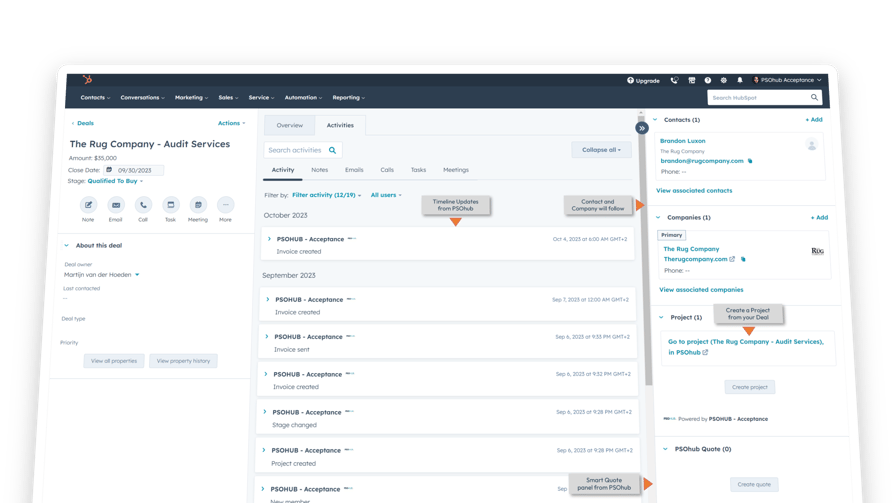
Create accurate quotes in a few clicks and turn deals into easy-to-sign digital contracts. Start your project instantly after signing—no manual entry needed.
Project Tracking
Simplify project management with clear charts, easy-to-use dashboards, and smooth integration with HubSpot and your invoicing systems.
Task Management
Keep track of priorities, assign tasks, and create charts and generate project reports easily. Make sure you oversee and organize your team's activities with success.
Resource & Capacity
Is your team at full capacity or do they have room for more tasks? PSOhub tracks availability and helps you allocate work efficiently.
Time & Expenses
Generate accurate timesheets and expense reports with automatic calendar sync, a Chrome extension, GPS tracking, and an easy mobile app.
Smart Invoicing
Link your billing software to HubSpot contacts, timesheets, and contracts to streamline invoicing, making it simple and efficient.
Tailored pricing plans that suit your business
We offer pricing plans that suit all kinds of organizations. Premium Software with Free Onboarding & Support
2-way sync keeps your HubSpot data flowing into PSOhub and back into HubSpot
Intuitive & familiar
PSOhub is tailored for HubSpot users, offering a familiar interface that simplifies project management. The onboarding process is straightforward, enabling you to start managing projects quickly and efficiently. Its intuitive design ensures that even those new to project management can navigate the platform with ease
The streamlined onboarding process ensures you can fully utilize PSOhub’s capabilities, including task management, time registration, invoicing, and smart planning, from day one.
Fastest onboarding tool
PSOhub's easy onboarding process is designed to get you up and running with minimal effort and maximum efficiency. From the moment you sign up, you'll be guided through a seamless setup that ensures you can start managing your projects and resources without any hassle. PSOhub's customer success team plans Fast Track sessions to get you and your team started with ease.
The intuitive interface walks you through each step, providing clear instructions and helpful tips along the way. Whether you're importing data, setting up user roles, or customizing your dashboard, PSOhub makes it straightforward and stress-free. Plus, with dedicated support available to answer any questions, you can be confident that your transition to PSOhub will be smooth and successful.

Work smarter
PSOhub simplifies your workday by automating resource planning, and time tracking, using predictive analysis to forecast project outcomes, and efficiently handling invoicing and contracts. Its smart features, such as automated reminders, real-time data insights, and seamless integration with other tools, keep everything in check for you, ensuring that you can focus on what truly matters without getting bogged down by administrative tasks.
Essentials
$ 25 / user / month
$ 30 / user / month
Great choice if you need:
- Task Management Manage all your project task in one overview
-
-
- Project Planning Plan your project with Gantt Charts, Kanban Boards and task management.
- Client Portal Standard Use our shareable link to give project info with unnamed guest accounts.
- Project Planning Plan your project with Gantt Charts, Kanban Boards and task management.
-
-
-
-
- Project Budgeting & Contracts Manage your budget with Fixed Fee, Expenses, Time & Material and Retainer contracts.
- Time Tracking & Expense Tracking Track your time via your Calendar integration, plugins, mobile phone or via our timesheet.
-
- Invoicing BasicAutomate your invoicing with standard invoice lay-outs.
- Standard DashboardsGet direct insight in the progress of your project.
- Fast Track Basic 2 online one-on-one Fast Track session with customer success agent.
-
- Time Tracking & Expense Tracking Track your time via your Calendar integration, plugins, mobile phone or via our timesheet.
- Project Budgeting & Contracts Manage your budget with Fixed Fee, Expenses, Time & Material and Retainer contracts.
-
-
Professional
$ 35 / user / month
$ 40 / user / month
All features of Essentials, plus:
- Task Management by Resource, Week and Project Manage all tasks from your resources and get an overview by resource, week and project.
- Client Portal Advanced Use named guest accounts with financial access and task edit access to share your project with external users.
- Extended Company Structure Extend your company structure with 3 additional business units.
- Project Manager Approval Project Managers can approve, modify or reject time entries.
- Quotes and SOW with Digital Signing Create detailed quotes and statement of works that you can share to sign digitally.
- Calculate Project Workload Oversee planned versus used hours.
- Basic scheduler It allows you to methodically organize events for your resource's day and list intended times where events take place.
- Manage AbsenceRegister a known absence, holiday or public holiday for your resources.
- Priority Support QueueGet priority support in the Chat.
- Fast Track Advanced3 online Fast Track onboarding sessions to get you started one-on-one.
Enterprise
$ 45 / user / month
$ 50 / user / month
All features of Professional, plus:
- Multi-Company Seperate projects and financials of multiple organizations.
- Multi-Currency Use multi-currencies for quoting, contracts, time and expense tracking and invoicing.
- Advanced Company Structure Extend your company structure with adding unlimited business units.
- Team Lead ApprovalTeam Leads can approve, modify or reject all time entries.
- Invoicing AdvancedAutomate your invoicing and use custom invoice lay-outs for every business unit.
- Resource PlanningPlan and schedule your resources.
- Resource Capacity OverviewDisplay each available resource's totals and zoom into a resource to see which projects they are planned for, the hours planned and the used hours.
- Advanced Scheduler It allows you to methodically organize events for your resource's day and list intended times where events take place.
- Smart Planning* Optimize your resource capacity with self-driving scheduling - *Available soon.
- Data Warehouse AccessCreate your own dashboards & reports via access to your data warehouse.
- Advanced Dashboards*Create your own dashboards and select your widget from our library - *Available soon.
- Health CheckUpon request, we perform a health check to optimize adoption. Limited to 2 sessions yearly.
Trusted by companies in 30+ countries. Want to know why?

"Excellent Project Management Software" "Simple and effective" "Simple, quick, efficient" "Excellent integrated PSO for HubSpot users" "All-in-one solution for businesses working with HubSpot" "The system we've been looking for" "A vital tool for our business" "Incredible customer service"
DPA & Cookies Legal Stuff Privacy Policy
© 2023 PSOHUB. All rights reserved.